You have just approved a budget of tens of millions of rupiah for a B2B digital marketing campaign. The ads are running smoothly, the website's visual design looks stunning on your computer screen, and traffic is increasing. However, when you look at the sales analytics dashboard, the conversion rates are abysmal. Visitors enter, then leave within seconds. This frustration often stems from one initial mistake: trying to save budget by hiring cheap Serang website services that provide you with obsolete templates full of junk code (bloatware). As a result, your website loads painfully slowly and fails Google's eligibility tests. In today's digital era, having a beautiful but slow website is like having a sharply dressed salesperson who ignores a client's greeting for several minutes.
For you—a Marketing Manager, Director, or CEO without a programming (coding) background—technical website speed terms often sound like an alien language. You know your website is slow, but you don't know how to diagnose it or how to direct your IT team to fix it. ArvelloCreative is here to bridge that communication gap. Through this comprehensive guide, we will translate complex Google technical metrics into logical business language. You will learn how to perform a Core Web Vitals speed audit independently, understand its impact on company turnover, and make the right architectural decisions to transform your slow website into an extreme-speed conversion engine.
Why is Core Web Vitals Not Just an IT Department Matter?
In many board meetings, website speed issues are often thrown entirely to the Information Technology (IT) department as a mere "server maintenance" issue. This is a fatal misconception. Core Web Vitals (CWV) is an official initiative from Google that assesses the quality of User Experience (UX) in the real world. If your website fails to meet CWV standards, this problem immediately turns into a marketing and sales crisis.
Let's use a technical analogy that is very easy to understand. Imagine the process of a prospect filling out a Request for Quotation (RFQ) form on your website like a checkout line at a supermarket. If your website is very slow to respond to clicks, it is like a cashier who is fast asleep while your VIP customer is ready to pay. The customer has to shout and wait a long time just to be served. Naturally, the VIP customer (your B2B client) will feel unappreciated, leave their shopping cart, and walk out toward your competitor's supermarket.
Based on global business analytics reports published by trusted institutions, [[Insert link to the Deloitte web speed and conversion research report here]], an improvement in website loading speed of just 0.1 seconds has a mathematical correlation capable of boosting conversion rates by up to 8% and average order value by up to 10%. When you ignore the impact of website loading speed on business turnover, you are literally sabotaging the Return on Investment (ROI) of your entire marketing department.
Dissecting the 3 Core Web Vitals Metrics Without Programming Language
Google uses dozens of metrics to assess websites, but for Core Web Vitals, they simplify it into three main pillars. As a manager, you don't need to know how to write the code; you only need to understand "what" is being measured and "why" it matters to your clients.
1. LCP (Largest Contentful Paint) – "How Fast Does Your Store Open?"
LCP measures the time it takes for your website to render or display the largest content element on the screen (usually the main image/hero image or a headline text block).
- Business Analogy: Imagine a client opening your store door. LCP is the time taken from the moment they push the door until the store lights turn on completely so they can see the main products you sell.
- Google Standard: A good LCP should happen within 2.5 seconds or less. If it is more than 4 seconds, your website is rated as very poor.
- Causes of Slowness: Uncompressed high-resolution images (a 5MB photo of your factory), cheap hosting servers, or conventional template systems that force the browser to download third-party scripts before displaying images.
2. INP (Interaction to Next Paint) – "How Fast Does the Waiter Respond?"
INP (which recently replaced the old First Input Delay / FID metric) measures the overall visual response delay of the website when a user interacts. For example, when a client clicks a dropdown menu, presses a "Play Video" button, or clicks a "Submit Form" button.
- Business Analogy: A customer calls a restaurant waiter to order. INP is the time gap between the customer raising their hand and the waiter turning around and answering, "Yes, how can I help you?". If the waiter only responds a minute later, the customer will be angry.
- Google Standard: A good INP should be below 200 milliseconds.
- Causes of Slowness: Too much JavaScript code running in the background (common in cheap template websites filled with plugins), overwhelming the user's smartphone processor so the screen appears to "freeze" for a moment when clicked.
3. CLS (Cumulative Layout Shift) – "Does Your Store Floor Shift?"
CLS measures visual stability. Have you ever read an article on your phone, and just as you were about to click a link, an ad or image suddenly loads at the top of the screen, pushing all the text down and causing you to misclick another button? That is what is called a Layout Shift.
- Business Analogy: Your client is trying to pick up an item from a supermarket shelf, but suddenly the shelf mechanically shifts one meter away, causing the item to fall. This is highly disruptive to comfort.
- Google Standard: A good CLS score should be below 0.1.
- Causes of Poor Scores: Developers forgetting to specify exact width and height dimensions for images or videos, so the browser does not reserve empty space beforehand and must shift the text once the image finishes downloading.
How Managers Can Perform a Self-Audit Using Free Tools
You don't have to wait for a monthly report from your agency to know the health of your website's performance. Google provides free and transparent tools that you can use at any time to audit your website and your competitors.
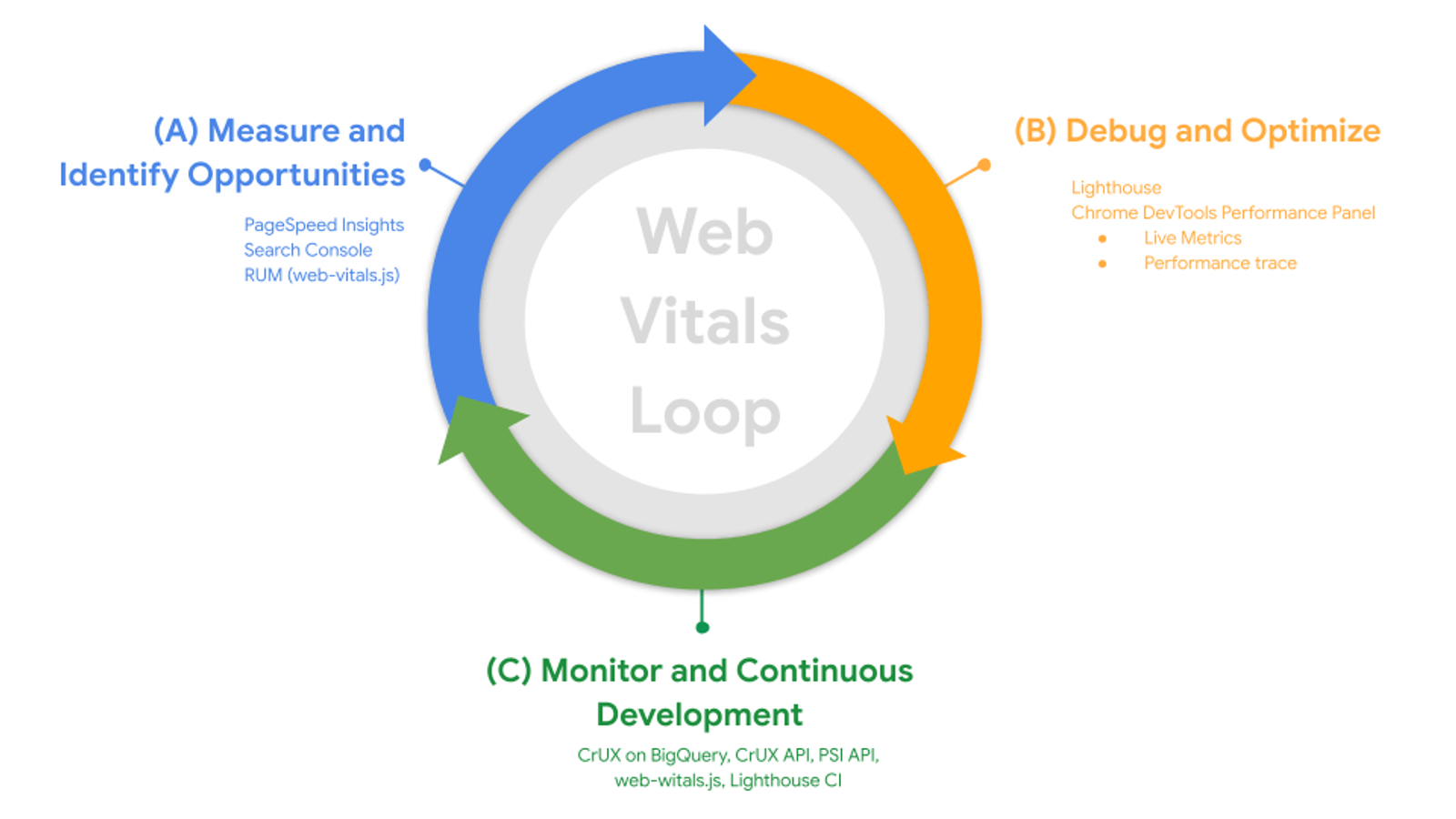
The first step is to open the Google PageSpeed Insights (PSI) site. Enter your company's website URL and press the "Analyze" button. Within seconds, Google will present a comprehensive report.
As a manager, focus on two main areas in the report:
- Discover what your real users are experiencing (Field Data): This is the most crucial data because it is based on the real experience of people visiting your website using their own internet networks (4G/5G) and devices over the last 28 days. If this section says "Failed," then you are currently receiving an SEO penalty from Google.
- Diagnose performance issues (Lab Data): This is a simulation from Google's bots. You will see LCP, CLS figures, and an overall performance score (on a scale of 0-100).
The report colors are very intuitive: Red (Poor/0-49), Yellow (Needs Improvement/50-89), and Green (Good/90-100). If your B2B website, which should be an authoritative corporate storefront, is filled with red, you have a strong data-driven argument to call your IT team or agency into the meeting room today.
Baca Juga: Rahasia Website Berkinerja Tinggi & Next.js: Keunggulan ArvelloCreative
Hidden Danger: The Trap of Cheap Serang Website Services That Ruin CWV
When you present those red audit results to a conventional IT agency, they will usually promise an "instant fix" by installing paid optimization plugins (such as caching plugins). For those who aren't technically savvy, the PageSpeed score might temporarily go up. However, this is a dangerous manipulation (smoke and mirrors).
Many cheap Serang website service providers build sites using legacy Content Management Systems (CMS) that rely heavily on dozens of plugins to operate. This monolithic architectural structure is inherently designed inefficiently. When they try to "game" Core Web Vitals, they usually use tricks like extreme JavaScript deferring.
The temporary result? Google's bots think the site loads faster. The real result in the field? When your B2B client tries to click a dropdown navigation menu in the first second, the menu doesn't work because its script code was intentionally delayed by that cheap plugin. The user experience (UX) is ruined, the client feels frustrated, and your company's professional reputation drops instantly.
You cannot turn an old car with a broken engine into a Formula 1 race car just by repainting the body and changing the oil. Conventional website performance issues exist at the foundational architecture level, not in cosmetic issues that can be solved with a single free plugin.
Headless CMS Architecture: The Permanent Solution for Green Score Performance
For corporations and medium-scale companies demanding high operational standards (E-E-A-T), the solution to this Core Web Vitals crisis requires migration toward next-generation software engineering. This is where ArvelloCreative redefines digital property development standards through the implementation of Headless CMS Architecture.
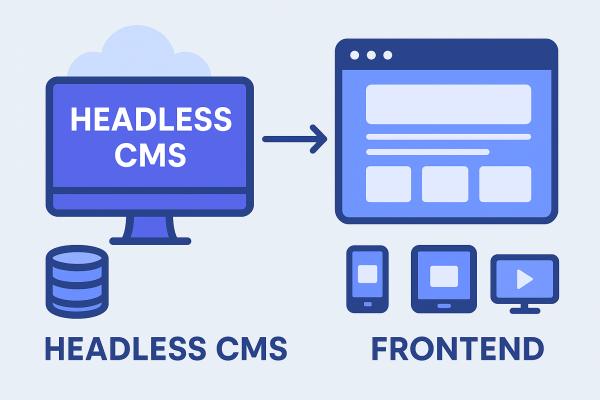
Why are the Chief Technology Officers (CTOs) of giant companies switching from monolithic CMS to Headless? In a Headless architecture, the "head" (the visual display accessed by your client) is totally separated from the "body" (the database and server system). We assemble your visual display using a very modern frontend framework: Next.js.
The magic of Next.js technology instantly cures your Core Web Vitals ailments:
- Fixing Red LCP: Next.js utilizes Static Site Generation (SSG). Your company's website pages are already rendered on the server into ultra-lightweight HTML document code before your client even tries to click them. When the link is clicked, this static document slides instantly to their phone screen without waiting for the server to process data (zero-latency). Your LCP score will turn green immediately.
- Fixing Red INP: Because the frontend is built without loading dozens of heavy junk plugins, user interactions become extremely smooth. There is no more lag when pressing buttons or filling out forms.
- Fixing Red CLS: Next.js components automatically discipline the structure of images and fonts, reserving empty space on the screen long before the image loads, ensuring your design elements stand firm like concrete and never shift to annoy the client.
Conclusion: Act Based on Data, Not Guesswork
Knowing that your company's website is performing poorly is a harsh reality check, but ignoring it once you understand the data is a form of fatal business negligence. Core Web Vitals is not just an SEO metric game for tech experts; it is a direct representation of how much you respect your B2B customers' time.
In 2026, when your competitors are racing ahead with instant Headless architecture websites, letting your digital property struggle with five-second loading times is equivalent to rejecting your own business's growth. Do not let the marketing budgets of tens of millions of rupiah that you spend every month be constantly wasted in a leaky funnel due to obsolete website infrastructure.
Are you ready to turn those red audit screens into green, and convert frustrated ad traffic into abundant corporate leads? Stop relying on instant solutions from developers who do not understand enterprise data architecture.
Take control of your digital performance today. Contact our software engineers and business consultants to secure a global-standard website creation services strategic partnership from ArvelloCreative. Schedule your free Core Web Vitals analytics breakdown session right now, and let's start redesigning a market-conquering machine that works as fast as your company's ambitions!